Blog
Learn the exact workflow to login multiple WhatsApp accounts (1–10 slots), filter a bulk list with round-robin processing, and export clean results you can actually use.
Important: Use only accounts you own and operate lawfully. WhatsPro Turbo Filter is a data-cleaning/validation tool and you are responsible for compliance with WhatsApp/Meta policies and local privacy laws.
What you need: Windows PC, Google Chrome, a stable internet connection, and 1–10 WhatsApp accounts ready on your phones (each account for one slot).
Turbo Filter can run with a single WhatsApp account, but multiple ready slots can improve throughput because the workload is split across accounts using a round-robin schedule.
This also helps distribute activity so one account doesn’t carry all requests during a large run.
If you’re new, start with 2–3 slots and scale up after you confirm everything is stable.
Download from the official download page, install, then open WhatsPro Turbo Filter.
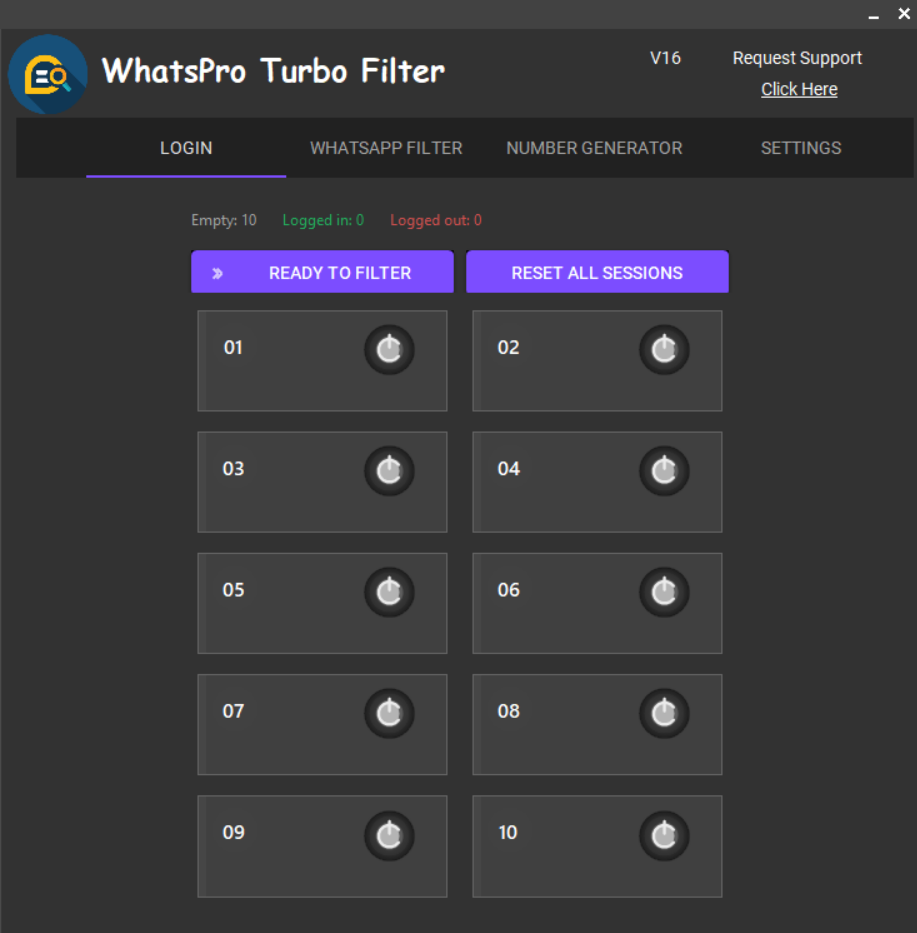
Go to the Login tab. Each slot is one WhatsApp Web session. Click Login for Slot 1, scan the QR, and wait until it shows Ready. Repeat for Slot 2… Slot 10.
Create a plain text (.txt) file with one phone number per line. Use international format if possible and remove duplicates for better efficiency.
Open the Filter screen, click Select File, then click Start. Numbers are distributed across all Ready slots automatically.
When the run completes, export existing and non-existing results. If any accounts become unavailable during a run, you can export remaining numbers and continue later.
Numbers Per Turn: If you experience instability, reduce the value. Start smaller and increase after a successful run.
Keep slots Ready: The more ready slots you have, the smoother the distribution.
If a slot logs out: Re-login that slot and continue in the next run. The software continues using other ready slots.
Contact support and we’ll help you get multiple accounts logged in and running smoothly.
No. You can login 1–10 accounts. The filter automatically uses whichever slots are Ready.
Yes. Start with fewer accounts to verify stability, then add more slots as needed.
One number per line in a plain text file (.txt). For best results use country code format and remove duplicates before filtering.
The slot stops processing, but other Ready slots continue. Re-login that slot later and continue in the next run.
Use the contact page to reach support.